
Agentic Design Patterns with AgentShip
Agentic Design Patterns with AgentShip: The Five Patterns You Need to Know


Introduction
Five agents walk into a production environment. Four of them crash. Here’s why—and how to build the one that doesn’t.
You know how AgentShip works under the hood. You’ve seen the architecture, understood the tradeoffs, and maybe even spun up your first agent. But here’s the thing: knowing the tools doesn’t mean knowing the patterns.
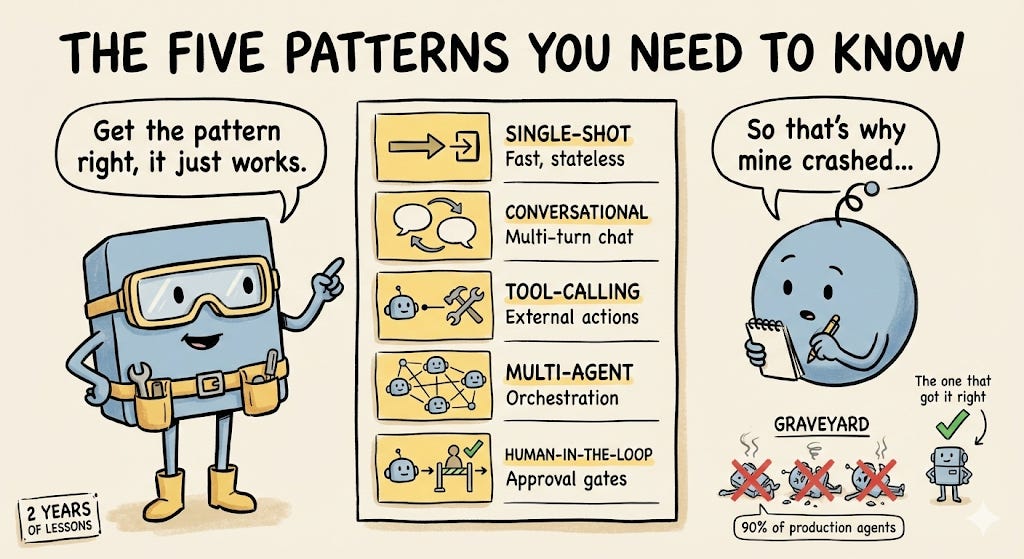
I’ve spent the last two years building production AI agents from health assistant to internal tooling at Audible. I’ve shipped agents that worked, and watched agents that crashed spectacularly. Through all of it, I’ve learned that most agent systems fall into five core patterns.
Get the pattern right, and your agent just works. Get it wrong, and you’ll spend weeks debugging why GPT-4 “forgot” the conversation or why your tool calls are timing out.
Let me save you those weeks.
The Five Patterns
Here’s the reality: 90% of production agents follow one of these five patterns. Master them, and you can build almost anything.
┌─────────────────────────────────────────┐
│ 1. Single-Shot        │ Fast, stateless │
│ 2. Conversational     │ Multi-turn chat │
│ 3. Tool-Calling       │ External actions│
│ 4. Multi-Agent        │ Orchestration   │
│ 5. Human-in-the-Loop  │ Approval gates  │
└─────────────────────────────────────────┘
Let’s break down each one with real code and real lessons.
Pattern 1: Single-Shot Agent
The simplest agent that could possibly work.
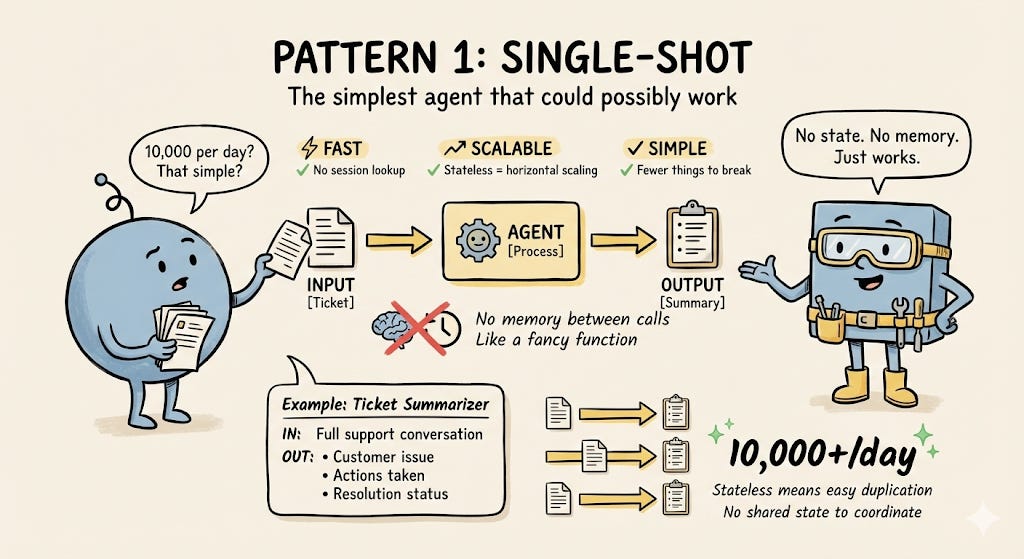
Single-shot agents do one thing: take an input, process it, return an output. No memory, no conversation history, no state. Think of them as fancy functions.
When to Use It
Summarizing documents
Classifying text (spam detection, sentiment analysis)
Data extraction (parse PDFs, scrape structured data)
Batch processing thousands of items
Real Example: Customer Support Ticket Summarizer
After a customer support conversation, we need to summarize what happened. The agent doesn’t need to remember previous summaries - each one is independent.
AgentShip Configuration
agent_name: ticket_summarizer
tags: [support, summarization]
llm_provider_name: openai
llm_model: gpt-4o
temperature: 0.3
execution_engine: adk
streaming_mode: event_based

description: Summarizes customer support conversations

instruction_template: |
  You are a customer support summarization expert.

  Summarize the customer conversation in 3 bullet points:
  - Customer issue/question
  - Actions taken
  - Resolution status

  Input format:
  - conversation: The full conversation transcript

  Output: A concise summary with 3 bullet points

tools: []  # No external tools needed
Why it works:
Fast: No session lookup overhead
Scalable: Stateless means easy horizontal scaling
Simple: Fewer things to break
Production lesson: We process 10,000+ summaries per day. Single-shot agents scale beautifully because there’s no shared state to coordinate.
Pattern 2: Conversational Agent
The pattern that made chatbots possible.
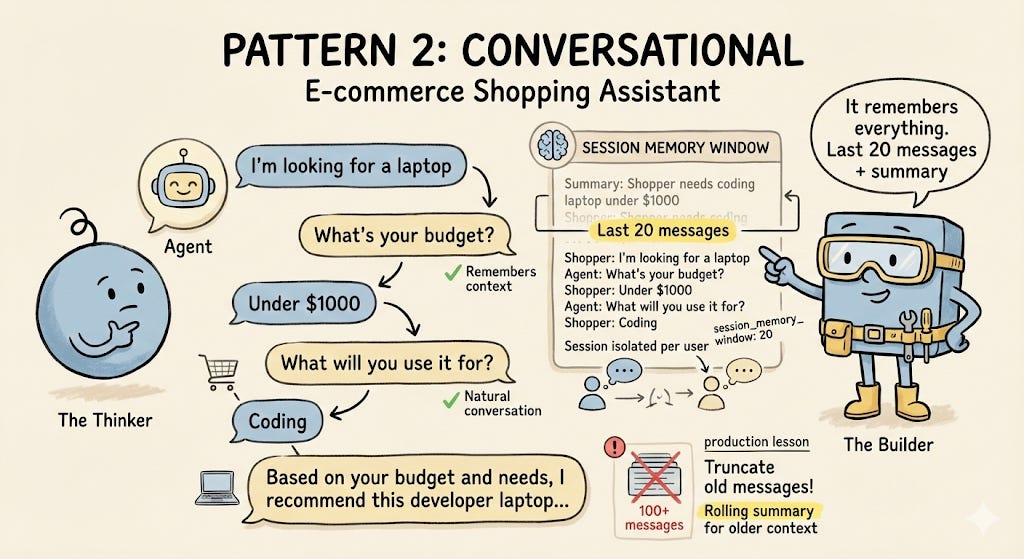
Conversational agents maintain context across multiple turns. They remember what you said three messages ago and can reference it. This is where sessions become critical.
When to Use It
Chat interfaces (customer support, personal assistants)
Progressive disclosure (asking clarifying questions)
Contextual recommendations
Any multi-turn interaction
Real Example: E-commerce Shopping Assistant
A user might say: “I’m looking for a laptop.” The agent asks follow-up questions about budget, use case, and preferences, remembers the answers, and provides personalized recommendations based on the full conversation.
AgentShip Configuration
agent_name: shopping_assistant
tags: [ecommerce, shopping, conversational]
llm_provider_name: openai
llm_model: gpt-4o
temperature: 0.7
execution_engine: adk
streaming_mode: event_based

# Enable session management for conversation history
session_enabled: true
session_memory_window: 20  # Keep last 20 messages

description: Personal shopping advisor with conversation memory

instruction_template: |
  You are a friendly shopping assistant helping users find products.

  You can:
  - Ask clarifying questions about budget, preferences, use case
  - Remember previous messages in the conversation
  - Provide personalized product recommendations

  Be conversational and helpful. Build on what the user has already told you.

  Input format:
  - message: User's current message
  - conversation_history: Automatically provided by AgentShip

tools: []  # Could add product search tools here
Why it works:
Context window management: Keep the last N messages
Session isolation: Each user has their own history
Natural conversation: Feels like talking to a human
Production lesson: We learned the hard way that you need to truncate old messages. Our first version tried to load the entire conversation history, it broke when users had 100+ messages. Now we keep the last 20 messages plus a rolling summary of older ones.
Pattern 3: Tool-Calling Agent
When your agent needs to do more than talk.
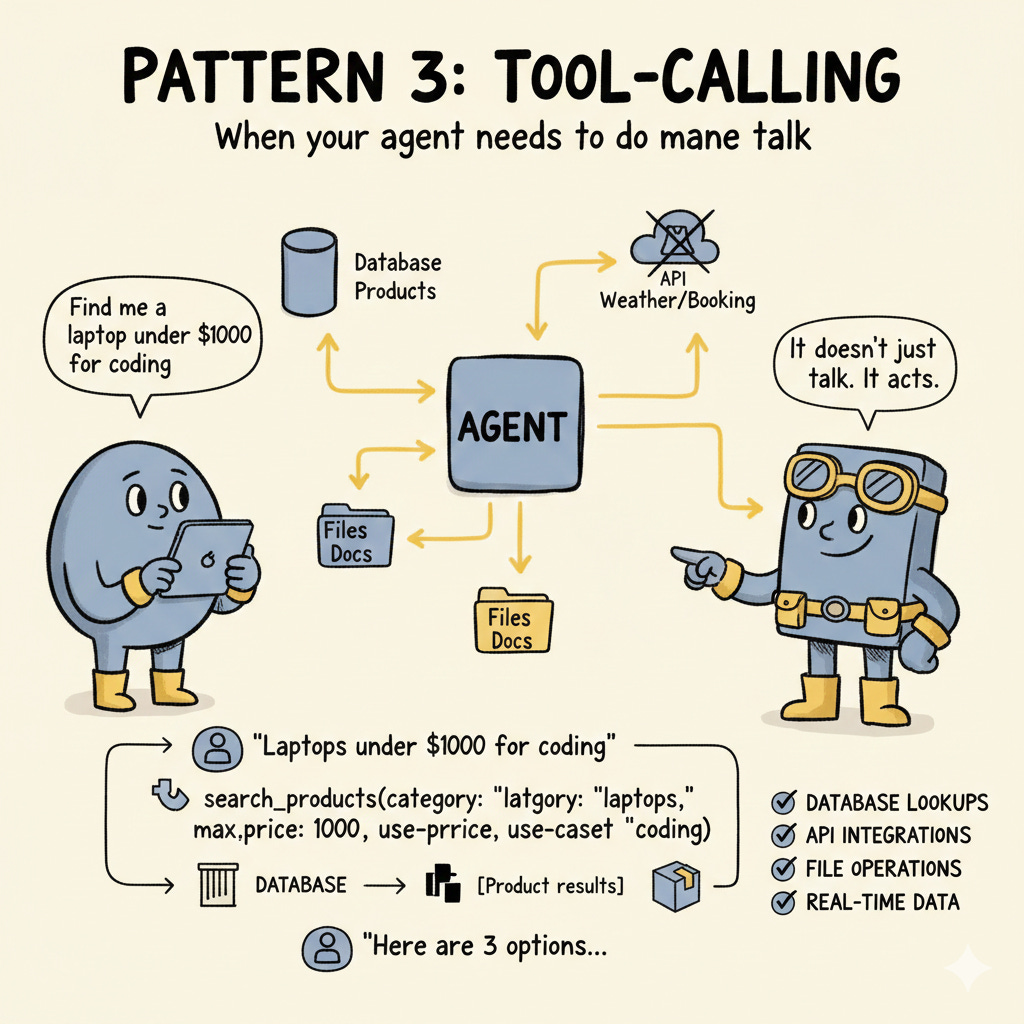
Tool-calling agents can interact with the outside world: query databases, call APIs, fetch real-time data. This is where agents become truly useful.
When to Use It
Database lookups (find customer orders, check inventory)
API integrations (weather, stock prices, booking systems)
File operations (read, write, search documents)
Any action that requires external data
Real Example: Product Search Agent
When a user is looking for products, the agent searches the product database and returns matches based on category, price range, and specifications.
AgentShip Configuration
agent_name: product_search
tags: [ecommerce, search, tools]
llm_provider_name: openai
llm_model: gpt-4o
temperature: 0.3
execution_engine: adk
streaming_mode: event_based
max_tool_iterations: 5  # Prevent infinite loops

description: Finds products matching user criteria using database tools

instruction_template: |
  You are a product search expert. Use the available tools to find products.

  Available tools:
  - search_products: Search by category, price, keywords
  - get_inventory: Check stock availability for a product

  Always use tools to get real data. Do not make up product information.

  Input format:
  - query: User's product search request

  Output: Product recommendations with prices and availability

tools:
  - type: function
    id: search_products
    function_name: search_products_db
    function_class: src.tools.product_tools.ProductSearchTool
    description: Search for products by category, price, and specs
    parameters:
      category:
        type: string
        description: Product category
      max_price:
        type: number
        description: Maximum price filter
      keywords:
        type: string
        description: Search keywords

  - type: function
    id: get_inventory
    function_name: get_product_inventory
    function_class: src.tools.product_tools.InventoryTool
    description: Check product availability and stock
    parameters:
      product_id:
        type: string
        description: Product identifier
Why it works:
Function calling: Modern LLMs know how to use tools
Structured output: Tools return JSON, not prose
Error handling: If a tool fails, the agent can try another approach
Production lesson: Always set max_iterations. We had an agent that got stuck in a loop calling the same tool 47 times before we killed it. Now we limit to 5 iterations and return a helpful error message if we hit the limit.
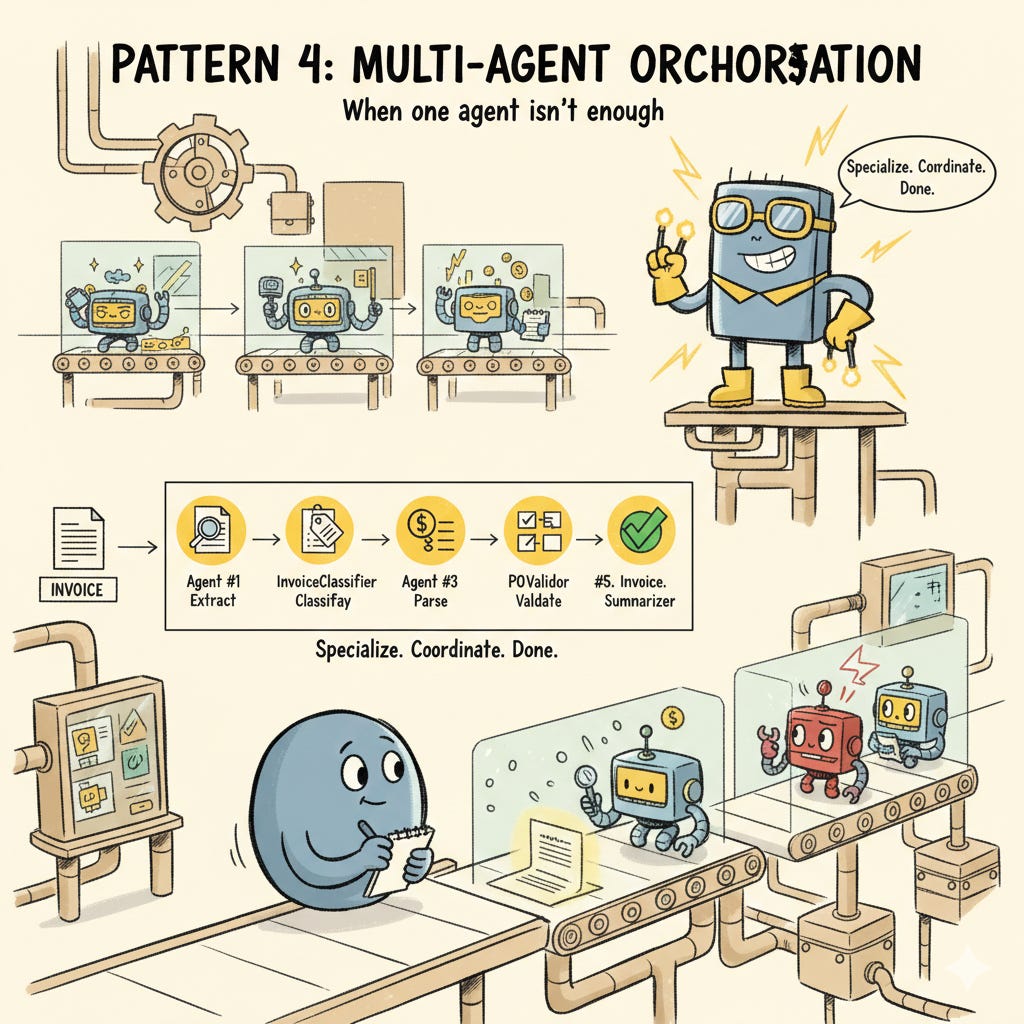
Pattern 4: Multi-Agent Orchestration
When one agent isn’t enough.
Multi-agent systems split complex tasks across specialized agents. Each agent is an expert in one domain, and an orchestrator coordinates them.
When to Use It
Complex workflows (process documents → extract data → validate → store)
Specialized domains (one agent for legal, one for finance, one for medical)
Parallel processing (summarize 10 documents simultaneously)
Divide and conquer strategies
Real Example: Invoice Processing Pipeline
When a user uploads an invoice, we need to:
Extract text from the PDF
Identify the invoice type and vendor
Parse line items and amounts
Validate against purchase orders
Generate a summary for approval
No single agent does all of this well. So we built five specialized agents.
AgentShip Configuration
agent_name: invoice_processor
tags: [finance, invoice, orchestrator]
llm_provider_name: openai
llm_model: gpt-4o
temperature: 0.2
execution_engine: adk
streaming_mode: event_based

description: Orchestrates invoice processing through specialized sub-agents

instruction_template: |
  You are an invoice processing orchestrator.

  Process invoices using these specialized agents in order:
  1. TextExtractor - Extract text from PDF
  2. InvoiceClassifier - Identify invoice type and vendor
  3. LineItemParser - Parse amounts and line items
  4. POValidator - Validate against purchase orders
  5. InvoiceSummarizer - Generate approval summary

  Pass outputs from each agent to the next in the pipeline.

  Input format:
  - pdf_url: URL to the invoice PDF

  Output format (JSON):
  - text: Extracted text
  - invoice_type: Classification result
  - line_items: Parsed items
  - validation: PO validation results
  - summary: Human-readable summary

tools:
  # Order matters: agents are called sequentially
  - type: agent
    id: text_extractor
    agent_class: src.agents.invoice.TextExtractorAgent

  - type: agent
    id: invoice_classifier
    agent_class: src.agents.invoice.InvoiceClassifierAgent

  - type: agent
    id: line_item_parser
    agent_class: src.agents.invoice.LineItemParserAgent

  - type: agent
    id: po_validator
    agent_class: src.agents.invoice.POValidatorAgent

  - type: agent
    id: invoice_summarizer
    agent_class: src.agents.invoice.InvoiceSummarizerAgent
Why it works:
Specialization: Each agent is optimized for one task
Modularity: Swap out agents without rewriting the pipeline
Debugging: Easy to isolate which step is failing
Production lesson: Multi-agent systems add latency. Our pipeline takes 8-12 seconds to run all five agents sequentially. We optimized by running steps in parallel where possible (e.g., classification and value extraction can happen simultaneously). This cut our latency in half.
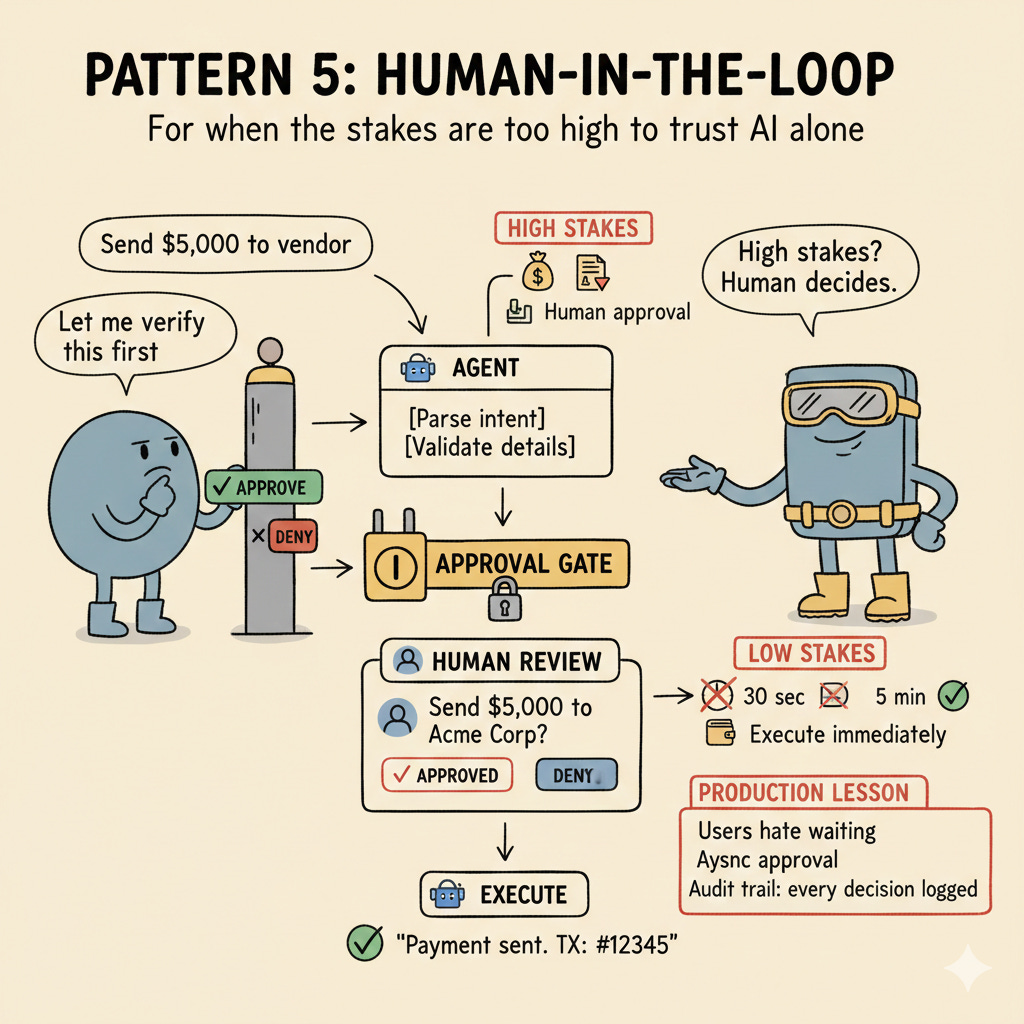
Pattern 5: Human-in-the-Loop Agent
For when the stakes are too high to trust AI alone.
Human-in-the-loop agents pause at critical decision points and wait for human approval before proceeding. This is essential for high-stakes operations.
When to Use It
Financial transactions (approve payments, transfers)
Legal/compliance decisions (approve filings, sign documents)
Medical actions (prescribe medication, schedule procedures)
Learning mode (verify agent behavior before full automation)
Real Example: Payment Processing Agent
When the agent suggests making a payment or transfer, we don’t do it automatically. We ask the user to confirm first.
agent_name: payment_processor
tags: [finance, payment, approval]
llm_provider_name: openai
llm_model: gpt-4o
temperature: 0.1  # Very deterministic for financial operations
execution_engine: adk
streaming_mode: event_based

# Human-in-the-loop configuration
approval_required: true
approval_timeout: 300  # 5 minutes
approval_actions:
  - send_payment
  - transfer_funds
  - process_refund

description: Processes payments with human approval gates

instruction_template: |
  You are a payment processing agent with strict approval requirements.

  For HIGH-STAKES actions (payments, transfers, refunds):
  1. Parse the user's intent
  2. Validate the payment details
  3. Request human approval (automatic gate)
  4. Execute ONLY if approved

  For LOW-STAKES actions (check balance, view history):
  - Execute immediately, no approval needed

  Input format:
  - message: User's payment request

  Output format:
  - For approved payments: Confirmation with transaction ID
  - For denied payments: Acknowledgment without action

tools:
  - type: function
    id: process_payment
    function_name: send_payment
    function_class: src.tools.payment_tools.PaymentTool
    requires_approval: true  # Triggers human approval
    description: Send a payment (requires approval)
    parameters:
      recipient:
        type: string
        description: Payment recipient
      amount:
        type: number
        description: Payment amount
      currency:
        type: string
        description: Currency code (USD, EUR, etc.)

  - type: function
    id: check_balance
    function_name: get_balance
    function_class: src.tools.payment_tools.BalanceTool
    requires_approval: false  # No approval needed
    description: Check account balance
    parameters: {}
Implementation details:
Approval UI: AgentShip provides a simple approval widget
State management: The agent’s state is persisted while waiting
Timeout handling: If the user doesn’t respond in 5 minutes, we cancel
Audit trail: Every approval/denial is logged
Production lesson: Users hate waiting. We originally had a 30-second timeout, which was too short—users would miss the notification. We increased it to 5 minutes, but also added the ability for agents to suggest actions without blocking, so users can approve asynchronously.
Putting It All Together ?
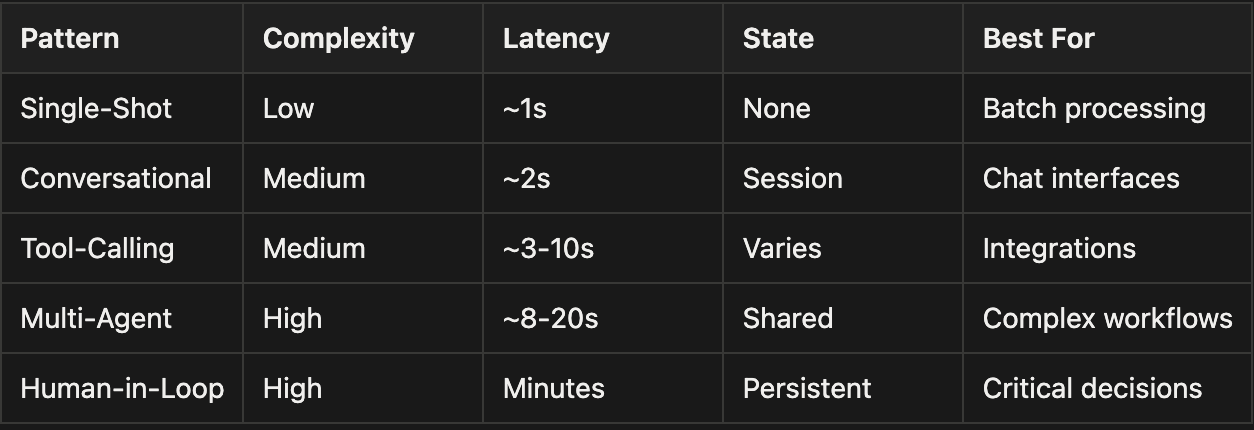
Rule of thumb: Start simple. Most teams over-engineer their first agent. Begin with a single-shot or conversational agent, then add complexity only when needed.
What’s Next?
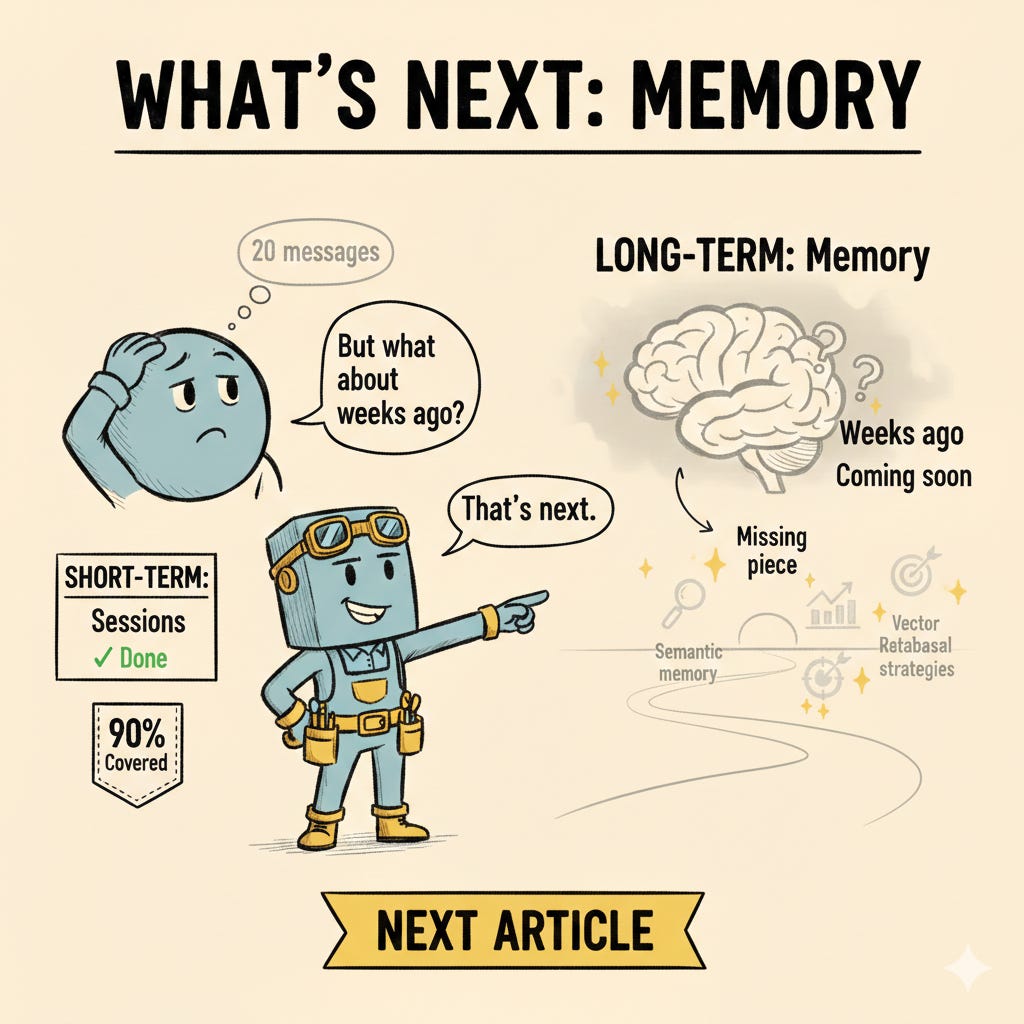
You now know the five patterns that cover 90% of production agent systems. But there’s a missing piece: memory.
Sessions give you short-term memory (the last 20 messages). But what about long-term memory? How do you let your agent remember things from weeks ago without loading every message into the context window?
That’s where semantic memory, vector databases, and retrieval strategies come in.
In the next article, we’ll dive into Memory with AgentShip: short-term vs long-term memory, semantic search, pgvector integration, and the memory patterns that make agents actually intelligent.
 | A guest post by
|